Wednesday, May 18, 2011

iPhone Calorie Counter

Are you worried about your health? It's never too late to make a resolution to start taking care of your health.  Whatever your goal weight or readings you want to see Calorie Counter by Viaden Mobile is a great way to keep a good track of your calorie intake and activities.
Whatever you would like to eat just let and iPhone count it for you and help you stay stably healthy.   Each individual have different body chemistry so over here you can create your specific profile, create your own diets, physical activity plans and view your progress over time.  This application have best updated database of 400,000 food items with customizable servings, recipes with images and detailed description, activities with info about burned calories! And even if you do not manage to find something, you can easily add it as a custom item. This app for iPhone and iPad will take all your requirements into account!  Make your healthiness a habit  - a resolution to start a new life.
Top 10 iphone applications to loose weight.(http://mashable.com/2009/01/03/free-iphone-apps-to-lose-weight/ )

Free Apps for iPhone

If you are familiar with the applications section of the phone's feature set you must be knowing that some applications require a fee as well as free iPhone applications are available in many categories such as games, communication software and productivity enhancements.  Many applications are provided without restrictions. Some applications don't require a fee, but are supported by and strategically placed advertisements that may limit your enjoyment of the application. Other applications are more a trial version that feature a limited set of features that can be unlocked by purchasing an upgrade. Finding iPhone Applications isn't a difficult process, but knowing where to look and how to review applications can save space on your iPhone.

Free iPhone Applications are available every day on the Apple Applications store. Applications are sometimes created by a company as a compliment for their products or services. Some applications are created by app companies that make money by developing Apple-related applications. Some applications are offered by individual programmers that are unaffiliated with a company.
Free applications list for iPhone can be found at http://iphoneapplicationlist.com/apps/

Monday, May 9, 2011

Find friends on map in iPhone and iPod

See where your friends are right now?
By adding latitude to your iPhone or iPod that gives easy access to Latitude in safari and to be able to update latitude information for your friends. Google Latitude and excellent way of getting informed about your friend's where abouts from your phone, computer or both.

How to?

1.Open http://google.com/latitude in Safari on your device.
2.Sign in to your Google Account.
3.Tap the + at the bottom of Safari.
4.Tap Add to Home Screen.
5.Tap Add to confirm and the icon will appear on your Home screen.


After you have added a Latitude icon to your Home screen, it can be moved to your main screen by tapping and holding down on the icon and then dragging it to another screen.

Monday, March 28, 2011

Watch thinner IPAD


Two cameras for FaceTime and HD video recording. The dual-core A5 chip. The same 10-hour battery life.1 All in a thinner, lighter design. Now iPad is even more amazing. And even less like anything else.


A5 Chip
Watch the iPad 2 video Thinner, lighter, and full of great ideas. Once you pick up iPad 2, it’ll be hard to put down. That’s the idea behind the all-new design. It’s 33 percent thinner and up to 15 percent lighter, so it feels even more comfortable in your hands.2 And it makes surfing the web, checking email, watching movies, and reading books so natural, you might forget there’s incredible technology under your fingers.

Monday, March 14, 2011

Problem with iPhone Clock

Apple continues to deal with problems with the clock on the iPhone -- this first cropped up back in November, when clocks were turned back an hour to standard time. Some issues were still popping up in January, and now this weekend, as clocks were turned forward for Daylight Savings time in the US, some users were still having issues of varying kinds, from clocks changing when they weren't supposed to, to alarms not going off when set up correctly. Some users are even reporting the time changing just fine, and then inexplicably switching back -- one of my friends had a problem like that with his first-generation AT&T iPhone last night.

Thursday, March 3, 2011

iPhone Tips & Tricks

iPhone is a great phone people think they can do any thing from it and workout with unlimited games application and many more.  It has also got limits and going offlimits
 may hamper your expensive phone.
1.       Avoid the App Addiction
Free Apps a bad thing for iPhone. People download a ton of apps, of course. Free apps. Apps for a buck. Game apps. Apps and more apps. Now with iOS folders, you can download even more apps on fewer home screens.

Tuesday, February 15, 2011

Jailbreak For iPhone

iPhone Dev team have just released PwnageTool 4.2 for iOS 4.2.1 that incorporates the untether exploit used by Chronic Dev Team in greenpois0n that was
released few days back. PwnageTool 4.2 will allow iPhone users to safely restore to a pre-jailbroken iOS 4.2.1 firmware and retain their current baseband
so that they can use Ultrasn0w to unlock their GSM iPhone. PwnageTool 4.2 also includes fixes for iBooks issue that we had reported earlier and Wi-Fi
problem on Apple TV 2G.

greenpois0n to jailbreak

Chronic Dev Team has just released greenpois0n to jailbreak iOS 4.2.1 for Windows for iPhone 4, iPhone 3GS, iPod Touch 4G,iPod Touch 3G and iPad.
In this guide, we will take you through the step by step procedure to jailbreak your iPhone 4 or iPhone 3GS on iOS 4.2.1 using greenpois0n.

Here are some important points to note before you proceed:
•Please note that jailbreaking your iPhone may void your warranty and hence proceed with caution and at your own risk.
•This guide is meant for iPhone 4, iPhone 3GS users only. iPod Touch 4G and iPod Touch 3G, iPod Touch 2G users can checkout this step-by-step guide and iPad users can checkout this step-by-step guide.
•Greenpois0n supports iOS 4.2.1 and iOS 4.1. So you need to first update your iPhone with iOS 4.1 or iOS 4.2.1 to use greenpois0n. Please do NOT upgrade to iOS 4.1 or iOS 4.2.1 if you want to unlock your iPhone.
•Please note that this guide is only meant for Windows users. Mac users can refer to this step-by-step guide.
•greenpois0n does NOT hactivate your iPhone, so your iPhone should be activated via iTunes first.
•Do not forget to backup your iPhone before you proceed. You can refer to this post for instructions on how to backup your iPod Touch.
•Please ensure you are running latest version of iTunes, iTunes 10.1 or later.
•After the jailbreaking process is complete, do not forget to checkout our article on tips to keep your iPhone secure.
You can follow these step-by-step instructions to jailbreak your iPod Touch:

Monday, February 7, 2011

No more Intel chip in iPhone

Apple is going to Abandon Intel Chips In Next Gen iPhone

Hon Hai Group and Foxconn are going to manufacture 5th gen iPhone.  This edition will be replacing Intel chips by Qualcomm baseband chip.  It’s expected to land just under a year from now. It will be drastic change if Apple drops away from the Infineon chips who are behind the baseband for the iPad 3G and all iPhone model since 2007.

Thursday, February 3, 2011

How To Save and Read Your iPhone Text Messages On Your Computer


This presentation will help you save all those important and juicy text messages on your iPhone to your computer for later reading.

If you followed my previous tutorial, “How To Recover Your iPhone Files, Photos, Contacts, Notes, SMS, Call History, Etc.”, you learned how to recover iPhone files from a backup on your computer to restore back to your iPhone. By now you should already downloaded and installed two free applications called DiskAid and iPhone Backup Extractor. For this tutorial, we only need DiskAid to transfer your text messages or SMS from your iPhone to your computer, but we need another one to read those messages from a database and save them in a file format that can be read and properly formatted by an application like MS Excel or any other spreadsheet. This is where we need SQLite Database Browser.

Wednesday, February 2, 2011

Fall asleep listening to iPhone


Now, there are several applications from the App Store that can help us relax and fall asleep by listening to the sound of nature, instruments, or other soothing sounds with timers to automatically turn-off the sounds at a pre-determined time. The applications reviewed here are Ambiance, iChillout and aSleep, all for $0.99 each. You don’t have to buy all of them. Their features are almost the same, and what’s more important is finding the sound that will help you relax and fall asleep.

Recover Your iPhone Files, Photos, Contacts, Notes, SMS, Call History, Etc.


For some reason, if you lost some important information on your iPhone, whether from 3rd party applications, your photos, contacts, notes, SMS, call history, calendar, etc., and doing a restore from iTunes is futile, don’t give up yet! As long as you have performed a backup in iTunes recently, your data is safely tucked away in a database in your computer—but you need another tool that can read and extract the data so you can copy it back to your iPhone.
~~~~~~~~~~~~~~~~~~~~~~~~~~~~~~~~~~~~~~~~~~~~~~~~~~~~~~~~~~~~~~~~~~~~~~~In case you want to know, your iPhone backups are located in your Mac (~Library/Application Support/MobileSync/Backup) or on a PC (c:\Documents and Settings\Application Data\Apple Computer\MobileSync\Backup).~~~~~~~~~~~~~~~~~~~~~~~~~~~~~~~~~~~~~~~~~~~~~~~~~~~~~~~~~~~~~~~~~~~~~~~
What You Need
Download and install the following:
DiskAid for Mac (http://www.digidna.net/products/diskaid)or Windows (requires a jailbroken phone to access the Root Folder)
iPhone Backup Extractor for Mac ( http://supercrazyawesome.com/ ) not sure if there is a Windows equivalent)


Use iPhone Backup Extractor

 
(1) Open iPhone Backup Extractor

(2) Click Read Backups
(3) Select from Device Name or Date where you want to retrieve your backup data and click Choose.

Monday, January 31, 2011

Sync your iPhone to a New computer

How to Sync your iPhone to a New computer without deleting your iPhone Apps
Synchornize iPhones to another (or a new) computer without having iTunes delete the apps they already have on the iPhone. Well, the answer is quite simple really.

Connecting your iPhone to the new computer :
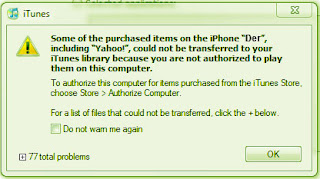
SInce you are connecting your iPhone to the computer for the first time, iTunes will ask you to authorize the computer. You are only allowed to authorize your iPhone to 5 different computers. Here’s what happens when I connect my iPhone to a PC for the first time and launch

 iTunes:


Sunday, January 30, 2011

Application available for iPhone 3G S in internet


iPhone 3G S GPS system

1. HeyWay – HeyWay uses GPS to locate your current position to share or send it to your friends through Push Notification. Which mean you don’t need to have the application running all the time.


2. Video Downloader iWoopie Lit – iWoopie Lite can search global video portals (Youtube/DailyMotion and match more), watch and download videos to your iPhone.

3. Trapster – Trapster will notify you of red light cameras and speed cameras around you. It also stores location where Police Often Hide. As you drive, it will notify you by voice when you are approaching any of those camera or police hide out location. Pretty cool application, just imagine your mobile telling you that you are moving towards speed traps.


4. Joost – Watch over 46000 videos from Joost on your iPhone or iPod touch with this free app Store app download from Joost.

Friday, January 28, 2011

Apple iPhone 3G S: Worth Standing in Line For?

Apple iPhone 3G S: Worth Standing in Line For?
The iPhone 3G S has better battery life, power and speed compared to the 3G, and provides hardware-based features that enhance existing apps and functions on the phone. If all that matters to you, then upgrading is worth it, but if you're more of a casual iPhone user, then you can probably afford to wait a little while before you upgrade.
That's because most of the new features come from the OS 3.0 software update. These include copy and paste, landscape keyboard for text and email, Spotlight, the new Voice Memo app and changes to the Safari browser.

iPhone Activation

AppleInsider and MacRumors  reported that Early iPhone 3G S adopters are having difficulty activating their iPhones, reports.  Apple’s iPhone service activation servers were unprepared to deal with the influx of new registrations from today’s iPhone 3G S launch, leaving the zero-day adopters with a potential two day wait.
Those who were lucky enough to purchase them in the early morning hours – or dedicated enough to wait in line overnight, like one Macworld intern – have been able to activate their new iPhones without incident. Other users are experiencing initial activation hiccups that can be solved by restarting the phone or taking the SIM card out and putting it back in. (No word yet on whether blowing on the iPhone like an Nintendo game cartridge helps anything.) Everyone else may have to wait for the servers to process the backlog. Ironically, some customer service representatives have been able to help out with activations, but that doesn’t help those who were relying on their new iPhones for telephone service.

Thursday, January 27, 2011

Three times faster

Apple's supports claims that iPhone 3G is two to three times faster overall, a just-completed teardown. Its hardware, including a faster microprocessor and a faster graphics processor than those in last year's model.

When Apple unveiled the iPhone 3G S recently, the company bragged about its performance, saying that the "S" stood for "speed," and that the new model was "up to 2x faster and more responsive than iPhone 3G."

Many people reported that they are unable to access Apple's servers due to unusually high traffic. They were trying to download the latest iPhone update, with But Apple's servers are now up to scratch and everybody should have the 3.0 software update installed on their iPhone and iPod Touch.

Sunday, January 23, 2011

White iPhone

How would you like to see white  iPhone in your hand? Yes, the white iPhone 4 may be landing in late February according to the Best Buy’s SKU (Stock Keeping Unit) system.  Two separate stores—Best Buy and Vodafone—now show SKUs for white iPhones in their systems, with Best Buy’s system showing a launch date in late February i.e. February 17.
Anyway recent leaks and talks give a hint that the Device is going to hit the Market soon. The white iPhone 4 release date has still yet to be announced. Many Apple iphone fans were expecting the white iphone 4 to be released only a few weeks after the original iPhone 4. However, hindrances have delayed the release date until Spring 2011 according to some sources and even then other sources are suggesting Apple bosses have scrapped the idea of a white phone altogether.
 

Saturday, January 22, 2011

iPhone 4 Most Successful

iPhone 4 'most successful product launch in Apple's history:

Steve Paul Jobs chief executive officer of Apple. iPhone sales figure went up to 1.7 million units in just two days, and could break 2 million.  Sales figures could have been larger still if Apple had been able to keep up with demand. Apple sold 600,000 smartphones during a one-day preordering period day in early June. It was the biggest one-day sale for the company and a 10 fold increase from the iPhone 3G.

Pentalobe screws in iPhone


You must have heard that Apple changed the type of screws (iphone 4 bottom had a +) that is used before. Tech Giant Apple now wants to keep out customers as well. The consumer tech pioneer is replacing screws on iPhone4s brought in for servicing with tamperproof screws to prevent anyone else from opening the device. The standard screws in iPhone 4’s are now being replaced with similar to Torx.